Planster vs Shopify Admin
Shopify retires Stocky on August 31, 2026 and has moved its operational half — purchase orders, transfers, receiving, adjustments — into Admin. It did not move the forecasting half. Admin tells you what you have. It never tells you what to buy.
The short answer
No tool wins for everyone. Here's the honest split.
Brands past roughly $10M that sell beyond Shopify and need a forecast, reorder points, and safety stock math on top of Admin — plus scenario planning and retail-deal demand Admin was never meant to handle.
Shopify merchants who mainly need to run inventory operations — POs, transfers, stocktakes, receiving. It is native, included, and for most former Stocky users it is genuinely the right landing spot.
Feature-by-feature
| Capability | Planster | Shopify Admin |
|---|---|---|
| Inventory operations (POs, transfers, receiving, adjustments) | Places and tracks POs through delivery; inbound shipment tracking | Native, included, and now the system of record after the Stocky migration |
| Demand forecasting (velocity + seasonality) | Best-fit statistical model per SKU (Prophet, ETS, SARIMA, regression), auto-selected and re-evaluated as patterns shift | None. Not a gap in the docs — Shopify does not offer it |
| Reorder points & safety stock | Reorder points and optimal order quantities per SKU; safety stock sized from actual demand variability and service-level targets | None natively — low-stock alerts require Shopify Flow or a third-party app, and a threshold alert is not a reorder point |
| Lead-time-aware ordering | Applies supplier lead times, MOQs, and container quantities to order timing | No lead-time modeling — an alert fires when stock is already low, not when it is time to order |
| Channels beyond Shopify | DTC, Amazon, Walmart, retail, wholesale + 150+ WMS/3PL systems via Trackstar | Shopify's own sales channels — your wholesale and retail demand lives elsewhere |
| Scenario planning with consequence preview | Sandbox what-ifs; see the POs that move and the capital committed before you commit it; version history + un-promote | None — Admin records what happened, it does not model what might |
| Retail-deal pipeline → demand | Deals overlay the plan at full volume with order-by dates and capital-at-risk math | None |
| Overnight agent | Nightly check of every SKU, PO, and channel; ranked morning digest with draft POs; reply in plain English | None — Admin is a screen you remember to open |
| Price | Flat ~$1,000/month, everything included | Included with your Shopify plan |
Where Planster pulls ahead
See what a decision costs before you commit
Planster's Master Plan runs every what-if through your real ordering engine and shows the consequence — which POs move and how much capital the change pulls forward — before you say yes. Most planning tools tell you what to reorder; Planster tells you what a whole scenario commits.
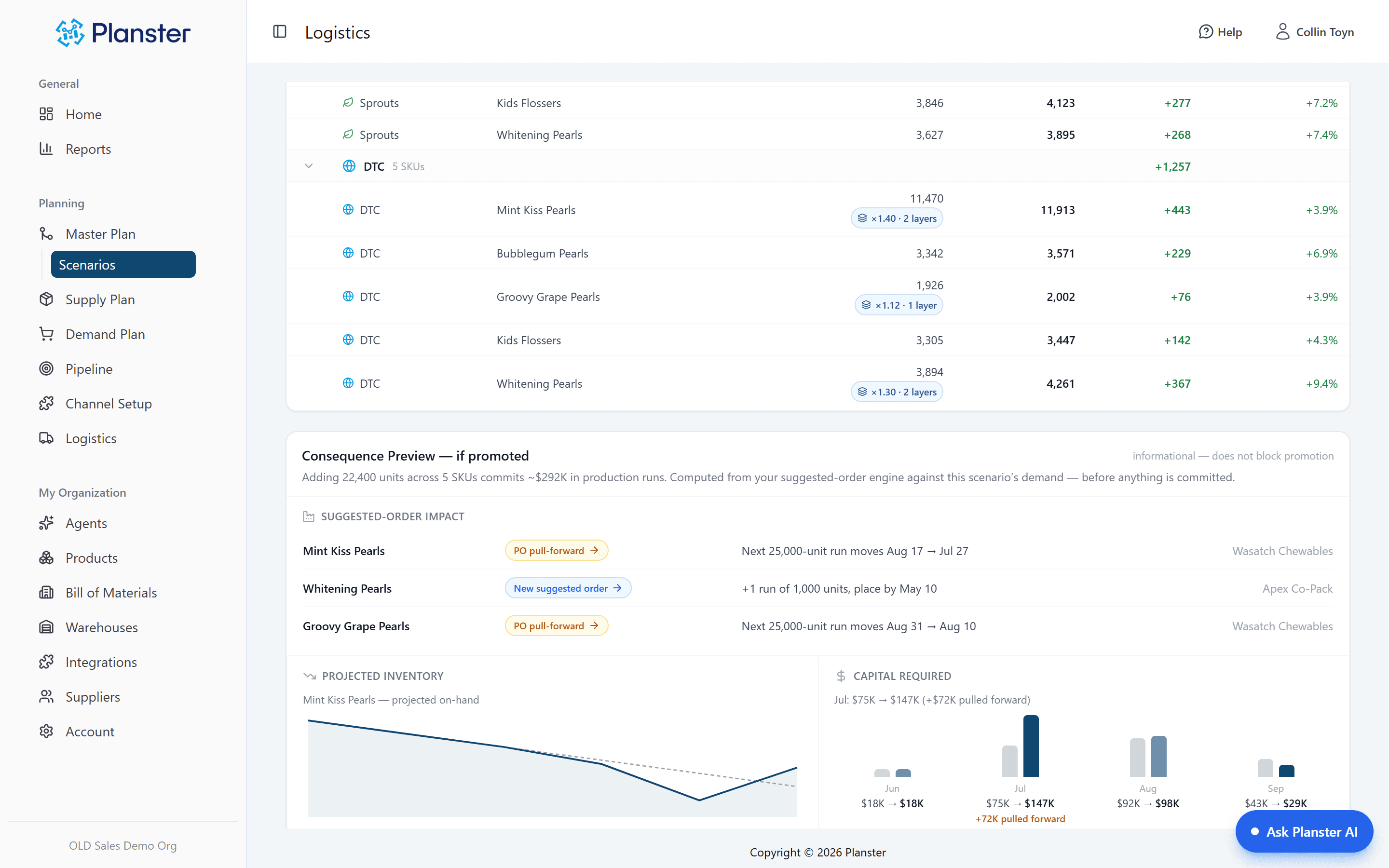
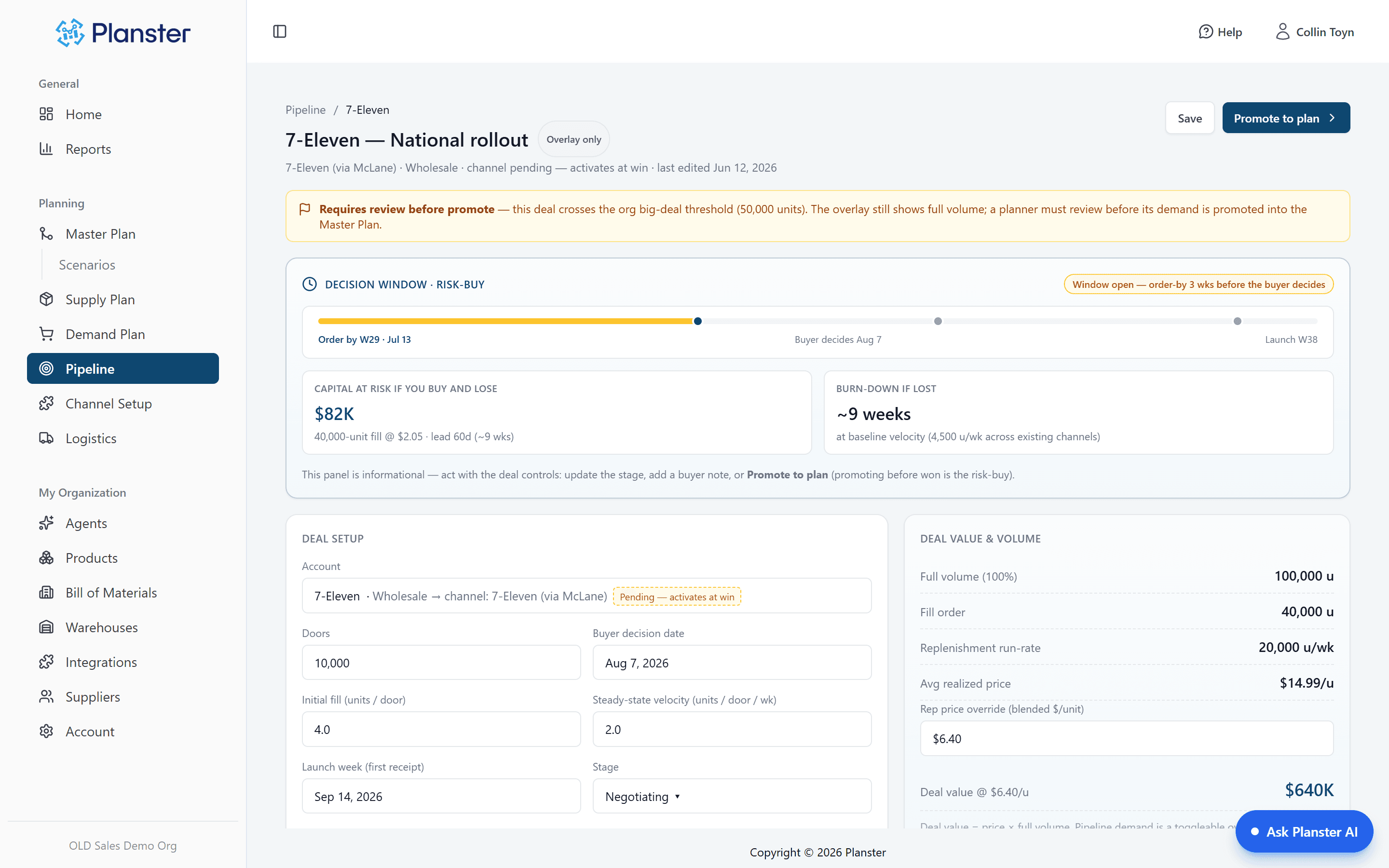
Plan the retail launch, not just the reorder
Planster's Pipeline treats retail deals as living demand: a deal overlays your plan at full volume and does the risk-buy math — the order-by date to hit the launch, and the capital at risk if it falls through. That founder-level "do I buy before the buyer decides?" question is one a reorder tool never answers.
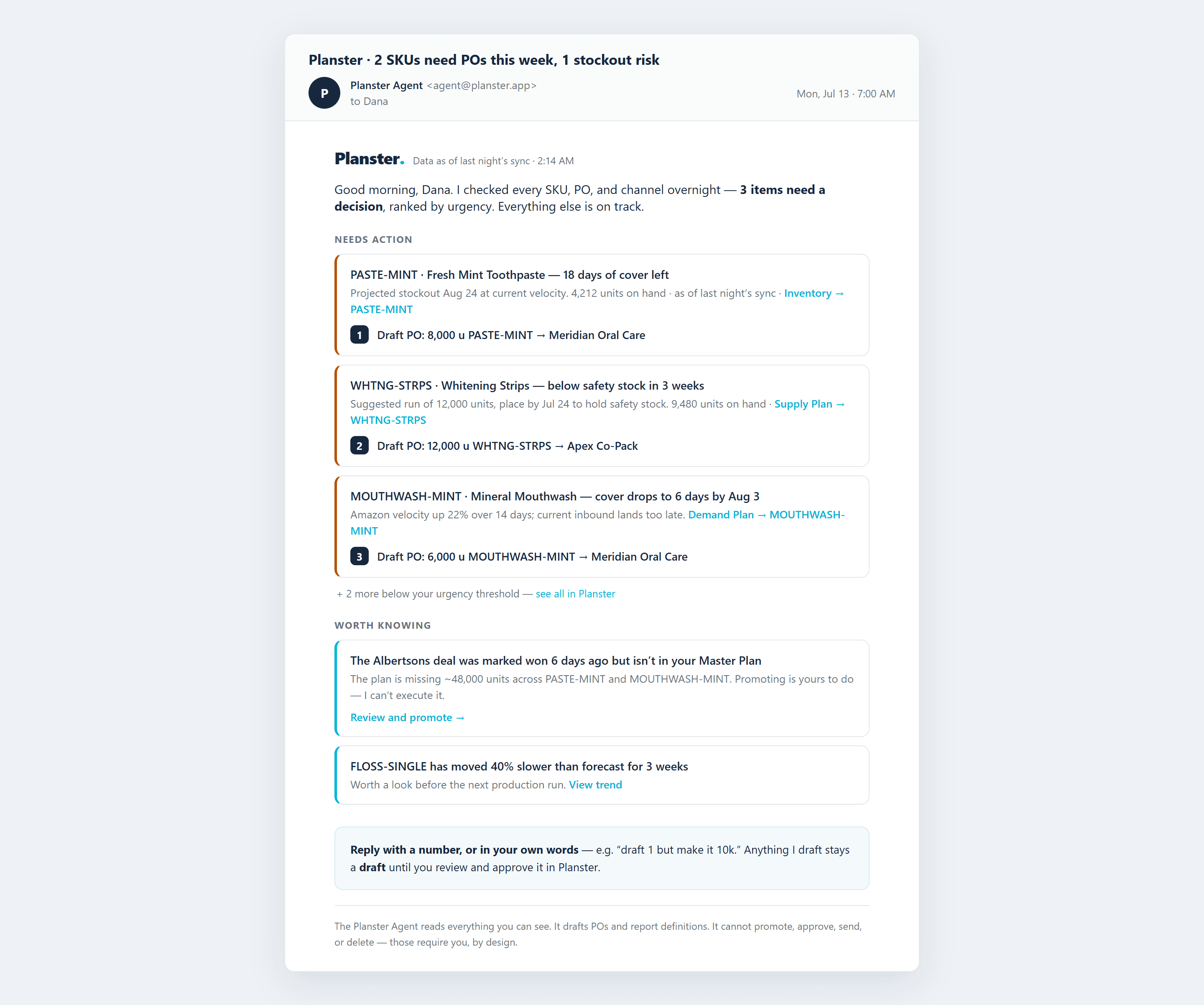
The grunt work happens overnight — the decision stays yours
Every night the Planster Agent checks every SKU, PO, and channel and emails a ranked morning digest with draft POs attached. Reply in plain English to draft; approve in the app. It cannot promote, approve, or send on its own — by design.
The gap shows up in Q4, not in September
Moving off Stocky is an operations project, and Admin handles it. Purchase orders still work. Transfers still work. Nothing visibly breaks the day Stocky goes dark — which is exactly why the real gap goes unnoticed for a quarter. It surfaces the first time you plan a peak season without a forecast underneath you: no velocity model, no seasonality, no safety stock math, no lead-time-aware order-by date. Just last year's numbers, a spreadsheet, and a gut call on a purchase order large enough to matter. Admin is the system of record for what you have. It was never built to tell you what to buy, and Shopify has not claimed otherwise.
Pricing
Flat ~$1,000/month, everything included — unlimited SKUs, users, warehouses, and integrations.
Included with your Shopify plan at no additional cost. Nothing Planster does changes that, and for operations you should keep using it.
This is not a like-for-like price comparison and we won't pretend otherwise. Admin runs inventory operations for free. Planster is a planning layer you add on top when a wrong buy costs more than the software — a single week of stockout on one product can run $5,000+, and a planning hire runs $150K+.
When Shopify Admin is the better fit
No tool wins for everyone. Here's where Shopify Admin is the honest choice.
- You mainly need inventory operations — POs, transfers, stocktakes, receiving. That is exactly what Admin absorbed from Stocky, it is native, and it is free. Use it.
- You run retail stores on Shopify POS. Store transfers and stocktakes belong in Admin; Planster does not replace that.
- You are Shopify-only under roughly $5M with steady, predictable demand — a spreadsheet against Admin's data may be honest enough, and Shopify apps in the $39–199/month range cover basic forecasting for far less than Planster.
- You need to migrate Stocky records right now. Planster is not a Stocky migration tool — export your POs and supplier data before access ends (suppliers cannot be exported directly, so budget time for that) and follow Shopify's migration path into Admin.
Common questions
Does Shopify Admin do demand forecasting?
No. Shopify Admin natively provides inventory tracking, adjustments, history, transfers, and purchase orders. It does not provide demand forecasting based on sales velocity and seasonality, reorder points, or safety stock calculations. Low-stock alerts are available through Shopify Flow or third-party apps, but a threshold alert is not a forecast — it tells you that you are already low, not what to order or when. (Verified against Shopify's inventory documentation, 2026-07-23.)
Is Planster a Stocky replacement?
Not in the direct sense, and it would be misleading to say so. Shopify moved Stocky's operational half — purchase orders, transfers, receiving, adjustments, inventory history — into Admin, and that is where those workflows now belong. What Shopify did not carry over is the planning half: forecasting, reorder suggestions, and stock optimization. Planster replaces that half, and runs on top of Admin rather than instead of it.
What happened to Stocky, and when?
Shopify removed Stocky from the App Store on February 2, 2026, and the app will no longer be available after August 31, 2026. At that point Stocky APIs stop working, and historical Stocky data does not automatically move into Shopify — there is a read-only window afterward, so export any records you want to keep before then. Inventory transfers and min/max forecasting were already removed in July 2025. (Source: Shopify's Stocky documentation, as of 2026-07-23.)
Do I have to leave Shopify or change my setup to use Planster?
No. Planster is a bolt-on, not a rip-and-replace. It connects to Shopify through Trackstar and pulls sales, inventory, and product data automatically, so Admin stays your operational system of record while Planster handles the planning layer on top. Most brands are running in days.
I already moved to Shopify Admin. Is it too late to add forecasting?
No — and moving to Admin was probably the right call. The two decisions are independent. Admin runs your inventory operations; a planning layer sits above it and reads the same data. Adding one later costs you nothing you already did, which is why most brands only go looking once they hit a season that punishes a bad forecast.
Shopify tells you what you have. Planster tells you what to buy.
Keep Admin for operations. Add the forecast, reorder points, and safety stock math Shopify never built — before peak season makes the gap expensive.